
from koo design studio newsletter – vol. 37(J) 04/06/2021
MAKING A VIDEO LIKE A PRO!

THIS IS 4TH OF THE SERIES
Some of you might think to make your product/service promotion video by yourself. It’s good idea and fun so let’s do it.
In this blog, I’d like to shares some professional tips for you. I hope that will help you to understand the production process and you succeed in your video production.
This is a series of 4 process tips:
- Planning (pre-production)
- Shooting (production) [This issue]
- Editing (post-production)
- Analysis (publish to YouTube and analyze the viewer)
Analysis (YouTube and analyze the viewer)
Congratulations! You’ve completed a video. Let’s publish through YouTube
YouTube
Sign in or create your account
YouTube become one of the most succeeded web broadcasting channel internationally without doubt. I recommend to create your channel. Just sign in as your Google account. So if you don’t have one, create one for your business (it can be a personal account too).
Upload a video
Click the video+ icon to upload your video from your computer.

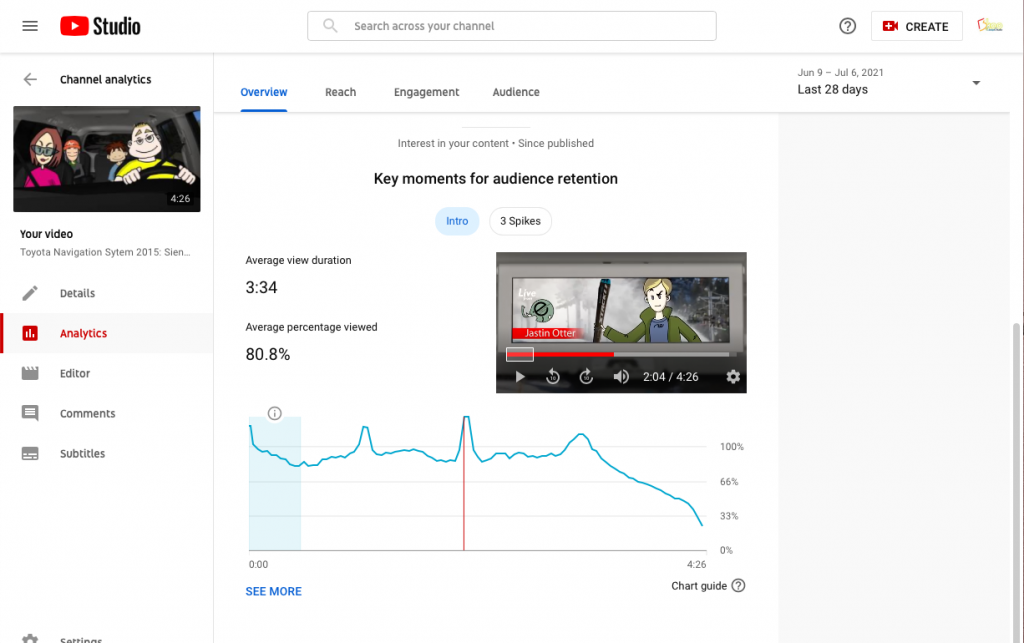
YouTube Studio
Under your account at the top-right, in the pull down menu, you can access your Youtube Studio, where you can analyze your channel analytics, viewer’s behavior for each video you’ve uploaded etc.. it’s a very powerful tool. Especially you can analyze each video’s viewer behavior. So you can re-edit the video accordingly or you can use as a reference to create a new video.
Other sharing sites
vimeo
It’s another great web video output source. You can login with your Facebook, Google, Apple, account or your email+password.
It’s pretty much the same as YouTube. But you need to upgrade to a payed account (Vimeo Plus and Vimeo PRO to use the full feature.
Instagram, Facebook, Twitter, linkedin
It’s slightly different from a video sharing site since it’s considered as a SNS but as long as you can promote your video, why not using it.
A Video is a communication tool, enjoy sharing your video.
koo design studio
I’m offering all aspect of video production, from consultation, production, publish, analyze circle with my long experience of all the process as a producer, director, editor, artist and sometimes as an actor! If you’ve already shot some beautiful footages and need to edit, you want to add some motion graphics to your video, you have a great idea but don’t know where to start, or you have a plan and you need some estimates. These all I can help.
I started making a 8mm film movie when I was 14 with my friends. It was a SF movie inspired by Star Wars episode IV which just came out. Since then I keep making films and videos, it’s been a long career. I’ve experienced many changes and I’m glad that the digital technology change many aspects of film/video making and distributions, at the same time, I miss a lot of things which has gone. The basic process of making a film/video has not much changed, either shooting in real or digitally generate a character, landscape, building etc.. you still need to shoot, you still need to edit and so on. I’m hoping that these tips help improve your production or encourage you to start something new. Probably it’s easy when you get started and if you are having a hard time finishing it, please let me know.
This series, I’ve avoid to describe too much details of each aspects such as how to shoot specific location or how to use an editing software, try to give some general information and tips. If you have any specific question, please feel free to leave a comment.
Today’s LIST OF TOOLS
| – Your computer with the internet access |
Of course!! If you need a professional consultation or production,
Please contact me anytime!!
I’ll give you more detailed advice for your successful production.
Thank you for reading